


A world map 3D view helps you explore Earth’s continents, oceans, mountains, and landscapes from a three-dimensional perspective. Unlike a traditional flat world map, an interactive 3D globe allows you to rotate the Earth, zoom into locations, and examine terrain from different angles.
This page provides printable 3D world map images and PDF downloads for educational activities, geography projects, classroom displays, and personal reference. You can also explore interactive tools such as Google Earth and ArcGIS Earth to see terrain and geographic features in greater detail.
World Map 3D View
Use the printable map below to explore the arrangement of Earth’s continents and oceans. Download the image or PDF for offline viewing, school projects, or geography reference.
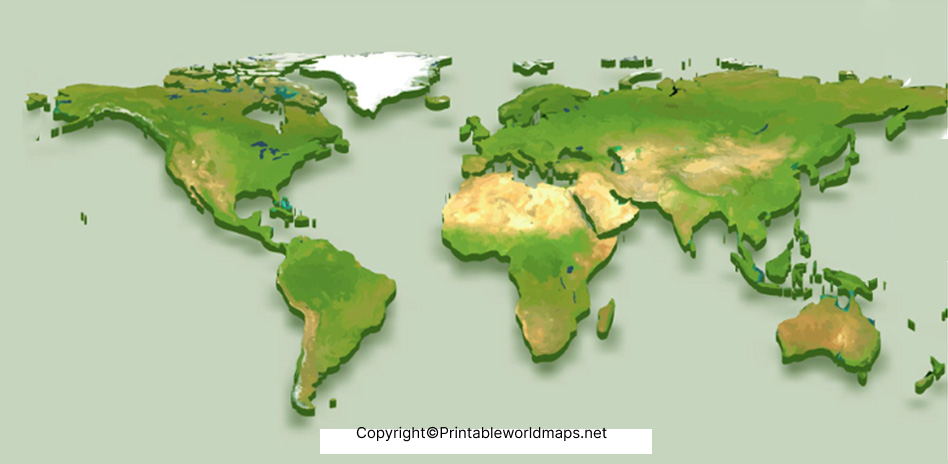
For the best results, choose the PDF when you need a printable copy. Check the page size and print preview before printing to ensure that labels and geographic details remain readable.
World Map 3D View [3D Map of World]
A three-dimensional globe provides a different perspective on the Earth’s surface. Depending on the map or software, it may display terrain elevation, mountains, valleys, satellite imagery, or three-dimensional buildings.

A printable image is useful for static reference, while an interactive globe is better for rotating the Earth, zooming into a location, and examining geographic features.
![World Map 3D View [3D Map of World]](https://worldmapblank.com/wp-content/uploads/2022/05/3D-World-map-1024x950.jpg?ezimgfmt=rs:828x768/rscb2/ng:webp/ngcb2 "World Map 3D View | Printable Earth 3D Map 3")
What Is a 3D World Map?
A 3D world map is a representation of Earth that uses depth, perspective, elevation data, or three-dimensional models to help people understand geographic features.
There are two common formats:
- Printable 3D maps: Static images or PDF files designed for printing, studying, and displaying.
- Interactive 3D globes: Digital applications that let users rotate, zoom, tilt, and explore the Earth’s surface.
Not every image labelled as a 3D world map contains measured elevation data. Some images use artistic shading or perspective to create a three-dimensional appearance. For accurate terrain analysis, use a geographic tool with elevation or terrain information.
Best Tools to Explore an Interactive 3D World Map
Several established mapping tools provide ways to explore the Earth. Choose one according to whether you need simple exploration, geographic data, or professional analysis.
1. Google Earth
Google Earth provides an interactive globe for exploring places, terrain, satellite imagery, and supported three-dimensional features. Users can zoom in, rotate the view, and tilt the perspective to examine mountains and landscapes.
It is suitable for students, teachers, travellers, and anyone who wants to explore locations visually.
2. OpenStreetMap
OpenStreetMap is a collaborative geographic database containing information such as roads, paths, and places. It is useful for viewing geographic features and accessing openly licensed map data.
OpenStreetMap itself should not be described as a complete 3D globe viewer. Three-dimensional visualizations depend on the software and data used with it.
3. ArcGIS Earth
ArcGIS Earth is a geographic visualization application that supports interactive 3D globe exploration and compatible geographic datasets. It can display supported spatial data, including KML and KMZ files, and offers tools for examining locations and measurements.
It is particularly useful for geographic education, planning, and professional mapping workflows.
4. Apple Maps
Apple Maps offers interactive map views and three-dimensional features in supported locations and on compatible Apple devices. Availability varies by region, device, and feature.
It is a practical option for users who want to explore supported cities and landmarks from an Apple device.
5. NASA WorldWind
NASA WorldWind is an open-source virtual globe technology project that has been used to visualize geographic and Earth science data. Before choosing it for a new project, check the current status of the relevant software, documentation, and maintenance.
Earth 3D Map
A digital Earth map can help you understand the relationship between physical geography and human settlements. Depending on the tool and available data, you may be able to explore:
- Continents and oceans: Identify the major landmasses and bodies of water.
- Mountains and valleys: Examine terrain shape and elevation where suitable data is available.
- Cities and landmarks: Explore urban areas and notable places using supported imagery or 3D models.
- Coastlines and islands: Observe how land meets the sea and compare geographic locations.
- Geographic coordinates: Learn how latitude and longitude identify locations on Earth.
- Satellite imagery: View landscapes and land-use patterns captured in available imagery.
A three-dimensional view is a visual aid, not automatically a source of precise measurements. For scientific work, verify elevation, distance, coordinates, and other measurements against appropriate datasets and documentation.

Benefits of Using a 3D World Map
Geography education
Students can use a 3D globe to understand the arrangement of continents, oceans, and major landforms. Comparing a globe with a flat map can also introduce map projections and the challenges of representing a spherical Earth on a flat surface.
Travel and geographic exploration
Interactive globes help users locate destinations and understand the geographic relationships between places. They can provide useful context before a trip, although a global view alone is not a substitute for current navigation directions.
Research and environmental awareness
When combined with suitable datasets, 3D geographic visualization can help researchers examine terrain, watersheds, land cover, and environmental changes. The reliability of any conclusion depends on the quality, date, resolution, and limitations of the underlying data.
Classroom projects and presentations
Printable world maps can be used for assignments, presentations, quizzes, and geography displays. A digital globe can complement a printed map by allowing students to explore the same locations interactively.
How to Use a Printable 3D World Map
Follow these steps to download and print a map:
- Choose the world map image that best suits your project.
- Open the corresponding PDF download link.
- Review the PDF to confirm that it displays correctly.
- Select a suitable paper size in your printer settings.
- Use print preview to check margins, image proportions, and readability.
- Print the map or save the PDF for later reference.
For interactive exploration, open Google Earth or another suitable globe application and search for the location you want to examine. Rotate, zoom, and tilt the view where those controls are available.
Frequently Asked Questions About World Map 3D View
1. What is a world map 3D view?
A world map 3D view represents Earth using a globe, terrain model, or three-dimensional visual effect. Interactive versions can allow users to rotate the Earth, zoom into locations, and examine supported geographic features.
2. Can I download a printable 3D world map?
Yes. You can use the image and PDF links provided on this page. Check the downloaded file and print preview before printing.
3. Is a printable 3D world map different from Google Earth?
Yes. A printable map is a static image or PDF, while Google Earth is an interactive globe that provides additional exploration features, including supported terrain and imagery.
4. Which tool is best for viewing Earth in 3D?
Google Earth is a convenient starting point for general exploration. ArcGIS Earth may be more suitable for working with supported geographic datasets and spatial analysis. The best option depends on your purpose and device.
5. Can a 3D world map show mountains and valleys?
Interactive tools with suitable elevation or terrain data can display mountains, valleys, and other surface features in three dimensions. A decorative 3D map image may not contain accurate elevation information.
6. Are 3D world maps accurate?
Accuracy varies by source. A map’s geographic boundaries, imagery, terrain resolution, and measurement tools may have different levels of precision. Use authoritative datasets when exact measurements or scientific conclusions are required.
7. Can I use a 3D world map for school projects?
Yes. Printable maps can support geography assignments, classroom displays, and presentations. Interactive globes can help students explore locations and understand the spatial relationships between continents, oceans, and landforms.
8. What is the difference between a 3D globe and a 3D terrain map?
A 3D globe represents Earth as a sphere. A 3D terrain map emphasizes surface elevation and landforms. Some interactive applications combine both, while others focus on one type of visualization.
Reference links
https://support.google.com/earth/answer/148186?hl=en-enCopy link
https://www.esri.com/en-us/arcgis/products/arcgis-earth/overviewCopy link
https://www.openstreetmap.org/copyrightCopy link
